


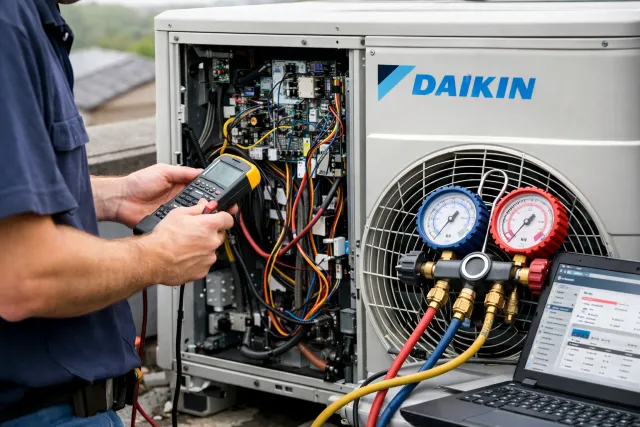
When your Daikin AC suddenly stops cooling and flashes a code, it’s tempting to panic. Don’t. Most faults are your system’s way of saying, “Something’s off, please check me,” and a lot of those checks are simple. This guide is built around Daikin Tech Support style troubleshooting: quick, practical steps you can do safely, plus clear “stop here and call a pro” points.
- Why error codes matter (and why you shouldn’t ignore them)
- Before you troubleshoot: quick safety rules
- Step 1: Identify the exact code the right way
- Step 2: Do the universal “fast reset” (the right way)
- Step 3: Check the three basics that cause most “errors”
- Common Daikin error codes: meanings, causes, and fast fixes
- Daikin Tech Support fix for U4: communication failure (indoor to outdoor)
- Daikin Tech Support fix for A1: indoor PCB fault
- Daikin Tech Support fix for A6 or E7: fan motor related faults
- Daikin Tech Support fix for C4 or C9: sensor faults
- Daikin Tech Support fix for U0: refrigerant shortage detection
- Daikin Tech Support fix for L5: inverter overcurrent protection
- The “fast maintenance” routine that prevents many errors
- Real-world scenarios (what the code usually looks like at home)
- When to call a technician immediately
- FAQs
- Conclusion
In the next few minutes, you’ll learn what the most common Daikin error codes usually mean, what causes them, and the fastest, safest fixes that often get you back to comfort. For the codes themselves, Daikin provides official resources you can use to confirm meanings for your model, and we’ll also show you how to read codes properly so you don’t chase the wrong issue.
Why error codes matter (and why you shouldn’t ignore them)
A Daikin system has sensors and control boards constantly checking temperature, airflow, voltage, and communication between indoor and outdoor units. When something looks unsafe or out of range, the system throws an error to protect expensive components like the inverter and compressor.
This is where Daikin Tech Support thinking helps: treat codes like symptoms, not a final diagnosis. The “fast fix” is usually confirming basics first (power, airflow, filters, wiring connections you can see, and a clean restart) before assuming the worst.
Also, maintenance is not just about avoiding errors. Heating and cooling are one of the biggest energy uses in a typical home. In the U.S., space heating and air conditioning together accounted for about 52% of household energy consumption (2020). That’s why quick troubleshooting and simple upkeep can make a noticeable difference in comfort and bills.
Before you troubleshoot: quick safety rules
Use these Daikin Tech Support safety rules every time:
- Turn off power at the isolator or breaker before opening any cover.
- Never open sealed refrigerant lines or touch the inverter board. Those are pro-only areas.
- If you smell burning, see smoke, or hear loud electrical buzzing, shut off power and call service immediately.
- Water + electronics do not mix. If there’s leaking into the indoor unit housing, power off first.
Step 1: Identify the exact code the right way
Different Daikin remotes retrieve codes differently, but many IR remotes allow a self-diagnosis routine where the display cycles until you hear a confirmation beep for the stored fault. A common method involves holding the “cancel” button until a “00” flashes, then stepping through codes until a long beep confirms the fault.
If you already have a code on the display, write it down exactly (example: U4, A1, C4, L5). Don’t “guess” similar-looking characters.
For confirmation, Daikin also offers an official error code search tool and regional error-code references, which is handy when your model’s code meanings vary slightly by series.
Step 2: Do the universal “fast reset” (the right way)
This simple reset solves more problems than people expect, especially after power fluctuations.
Daikin Tech Support reset steps:
- Set the AC OFF from the remote.
- Turn OFF the power at the wall isolator or breaker.
- Wait 5 minutes (not 20 seconds).
- Turn power back ON.
- Start the AC and watch it for 10 minutes.
If the code returns immediately, it usually means a real fault is still present, not a one-time glitch.
Step 3: Check the three basics that cause most “errors”
Before digging into code-specific fixes, run this quick checklist. It’s the closest thing to a universal Daikin Tech Support playbook.
1) Airflow
Poor airflow can trigger protection faults and sensor alarms.
- Clean filters (more on this below)
- Make sure supply vents are open
- Remove anything blocking the indoor intake
ENERGY STAR specifically recommends checking your filter monthly and changing it regularly to improve HVAC efficiency.
2) Power quality
Low voltage and surges can trigger dropout or board-related faults. Some Daikin code sets even include voltage-related system faults (example: U2 for drop voltage/overvoltage on certain series).
If your area has unstable power:
- Use a properly sized stabilizer where recommended by local installers
- Avoid running the AC on overloaded circuits
3) Indoor-outdoor communication
A big chunk of Daikin issues come from the indoor and outdoor units not “talking” properly. Loose signal wiring, corrosion, or a power event can cause communication errors like U4 in some series.
Common Daikin error codes: meanings, causes, and fast fixes
Below is a practical, homeowner-friendly list of codes that appear frequently across many Daikin families (split, SkyAir, and similar). Always treat this as guidance, then confirm for your exact unit using Daikin references.
Quick reference table (fast fixes first)
| Error Code | What it usually means | Common causes | Fast fixes you can try |
|---|---|---|---|
| U4 | Transmission failure between indoor and outdoor units | Loose signal wiring, power interruption, board communication issue | Reset power, check visible wiring/conduit damage, confirm outdoor unit has power |
| UA | Indoor-outdoor combination fault | Mismatched units/settings, install/config issue | Reset, confirm recent installation changes, call installer if new setup |
| U0 | Refrigerant shortage detection (varies by series) | Possible leak, undercharge, install issue | Reset once; if returns, stop DIY and call pro |
| A1 | Indoor unit PCB defectiveness (board fault) | Power surge, moisture, board failure | Reset; if returns quickly, service required |
| A6 | Fan motor fault (indoor) | Stuck fan, capacitor/driver issue, debris | Turn off power, check for visible obstruction, call if motor won’t start |
| C4 | Heat exchanger temp sensor fault | Sensor out of range, wiring issue | Reset; ensure filters clean; service if persistent |
| C9 | Suction air temperature sensor fault | Sensor/wiring issue, airflow problems | Clean filters, reset, service if returns |
| E1 | Outdoor circuit board fault | Power surge, board failure | Reset once; if returns, service required |
| E7 | DC fan motor fault (often outdoor) | Fan obstruction, motor/driver failure | Clear debris around outdoor unit, reset, service if returns |
| F3 | High discharge pipe temperature control | Dirty coils, airflow restriction, refrigerant issues | Clean filters, clear outdoor unit airflow, service if persistent |
| L5 | Output overcurrent (inverter protection) | Electrical fault, compressor/inverter issue | Power reset; if returns, stop and call pro |
Code meanings above align with Daikin regional code references and malfunction charts for certain product lines.
Now let’s walk through the “fast fix” steps that match real-life situations.
Daikin Tech Support fix for U4: communication failure (indoor to outdoor)
If you see U4, the system is essentially saying the indoor and outdoor units aren’t communicating properly (common on several Daikin series).
What it feels like
- Indoor unit powers on, then stops
- Outdoor unit may not start
- Error returns after reset
Fast fixes
Use this Daikin Tech Support sequence:
- Confirm outdoor unit has power
Many people reset only the indoor unit. Make sure the outdoor isolator is ON and the breaker isn’t tripped. - Do the 5-minute full power reset
Turn off the entire system at the breaker/isolator and restart properly. - Visually check the interconnect cable route
Without opening panels, look for obvious damage: crushed conduit, rodent-chewed cable, loose external junction box. - Reduce electrical noise
If possible, avoid running heavy appliances on the same circuit during startup.
When to stop DIY
If U4 returns repeatedly, the fix often involves testing signal wiring continuity and control boards. That’s professional territory.
Daikin Tech Support fix for A1: indoor PCB fault
On many Daikin references, A1 points to an indoor PCB (control board) issue.
Fast fixes
- Do the full reset (5 minutes)
- Make sure there is no water dripping into the indoor unit housing
- If you’ve had recent power events, consider a surge protector solution recommended locally
Reality check
If A1 returns quickly, it’s rarely solved by cleaning filters alone. In most cases, an HVAC technician needs to inspect the board and wiring safely.
Daikin Tech Support fix for A6 or E7: fan motor related faults
Fan issues can show up as indoor fan faults (like A6 on some charts) or outdoor DC fan issues (like E7 in certain lists).
What to do first
- Turn power off
- Check for obvious obstructions:
- Indoor: plastic bag near intake, heavy dust mat on filter
- Outdoor: leaves, polythene, vines, a loose cover touching the fan area
The fast fix that works surprisingly often
Clean the filters and ensure the indoor intake is not blocked. Poor airflow can make the fan work harder and cause protective shutdowns.
When it’s not a DIY fix
If the fan tries to start, hums, or stops repeatedly, it may be a motor/driver/capacitor issue. Call service.
Daikin Tech Support fix for C4 or C9: sensor faults
Daikin code references commonly list C4 as a heat exchanger temperature sensor fault and C9 as a suction air temperature sensor fault (varies by series).
Fast fixes
- Clean filters and restart
- Make sure the indoor unit isn’t exposed to weird conditions (open window blasting hot air into the sensor area)
- Let it run 10 minutes after reset
What usually causes repeat sensor errors
- Sensor connection loosened over time
- Moisture or corrosion
- Actual sensor failure
If it repeats, a technician can test sensor resistance values and replace safely.
Daikin Tech Support fix for U0: refrigerant shortage detection
Some Daikin code lists show U0 as refrigerant shortage.
What homeowners often notice
- Cooling gets weak over days or weeks
- Ice on indoor coil or pipes (sometimes)
- Longer run times
Fast fix (the honest one)
There isn’t a true DIY “recharge.” If it’s a refrigerant issue, the right solution is:
- leak check
- proper repair
- evacuation
- weighed-in charge per spec
If U0 appears more than once after a reset, book service. Running low refrigerant can overheat and damage the compressor.
Daikin Tech Support fix for L5: inverter overcurrent protection
L5 is commonly described as output overcurrent protection on certain Daikin references, often tied to inverter/compressor electrical protection.
What to do immediately
- Turn the unit off
- Do a single proper power reset
- Ensure the outdoor unit is not choked with debris and has free airflow
When to stop
If L5 returns, don’t keep resetting. Repeated overcurrent events can stress components. Get a professional diagnosis.
The “fast maintenance” routine that prevents many errors
This is simple Daikin Tech Support prevention that reduces the odds of sensor, airflow, and temperature protection faults.
Every 2 to 4 weeks in heavy season
- Wash or replace filters (depending on model)
- Wipe dust around intake vents
- Make sure curtains or furniture aren’t blocking airflow
ENERGY STAR highlights filter checks as a key step for efficient heating and cooling performance.
Every 2 to 3 months
- Check outdoor unit clearance
- Remove leaves and plastic
- Ensure nothing is leaning against the coil
Twice a year (best practice)
- Professional servicing: coil cleaning, electrical inspection, drain line check, refrigerant performance check
Real-world scenarios (what the code usually looks like at home)
Scenario 1: “It worked yesterday, today I see U4”
This is classic after a power dip.
- Do the full power reset
- Confirm outdoor power
- If it returns, suspect wiring/communication and call service
Scenario 2: “Cooling is weak and now I see U0”
This often develops gradually.
- Don’t chase it with endless resets
- Book a leak check and proper refrigerant service
Scenario 3: “I cleaned the filters, but C9 keeps coming back”
Filters help airflow, but persistent C9 often points to a sensor or wiring issue that needs testing.
These patterns match how Daikin fault references classify communication, refrigerant, sensor, and PCB-related faults across product families.
When to call a technician immediately
Even with the best Daikin Tech Support checklist, some situations should be handled by a qualified technician:
- Error returns instantly after a correct reset
- Burning smell, smoke, or hot electrical odor
- Tripping breaker repeatedly
- Ice buildup that returns quickly after cleaning filters
- Codes related to inverter, PCB, or compressor protection (like L5 or certain E-series faults)
FAQs
How do I find my Daikin error code if nothing shows on the display?
Many Daikin IR remotes support a fault retrieval mode that cycles through stored codes until a long beep confirms the fault. The “00 flashing then cycle” method is described in troubleshooting guides used for certain remote families.
Is it safe to keep running the AC when an error code appears?
If the system is showing a code and stopping, it’s usually protecting itself. Repeatedly forcing restarts can make things worse, especially for inverter and compressor protection faults.
What’s the most common fix I can do myself?
Cleaning filters and ensuring airflow is open is the most common “fast fix.” It also supports efficiency and comfort, which ENERGY STAR emphasizes for heating and cooling systems.
Where can I confirm the meaning of my code?
Daikin provides official error code resources, including an error code search tool and product-line malfunction code charts in some regions.
Conclusion
Most AC faults aren’t mysteries. With the right Daikin Tech Support approach, you start with basics: correct code reading, a proper reset, airflow checks, and outdoor unit clearance. Codes like U4 often relate to communication, C-series codes frequently point to sensors, and U0 can hint at refrigerant problems that require professional service.
If you’re using a modern system that heats and cools, remember that many setups work like a heat pump, which makes airflow, sensors, and outdoor clearance even more important for stable operation. Do the fast fixes once, watch for repeat errors, and call a technician when the code comes back quickly. That balance is what real Daikin Tech Support looks like in everyday life.