

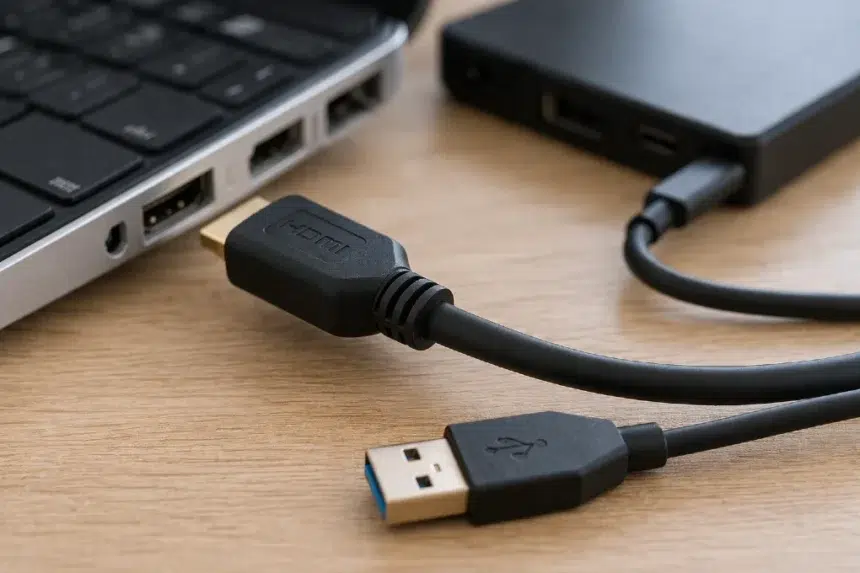
If you have ever stood in an electronics aisle or stared at the back of a monitor wondering which cable actually gives you better performance, you are not alone. Cable HDMI and USB can look like a simple comparison at first, but the answer changes depending on what you are connecting, what kind of performance you want, and whether your priority is video quality, data speed, charging, or convenience. HDMI was built primarily for audio and video delivery, while USB evolved into a flexible standard for data transfer, power delivery, and, in some cases, display output. That difference shapes everything.
- What makes Cable HDMI and USB different in the first place?
- Cable HDMI and USB at a glance
- When HDMI clearly performs better
- When USB performs better
- The real performance question is not HDMI vs USB
- Real world scenarios that make the choice easy
- Common mistakes people make with Cable HDMI and USB
- Which one is better for picture quality?
- Which one is better for speed?
- Buying tips that save money and headaches
- FAQ
- Final verdict
For most people, the fast answer is this: HDMI usually wins when your goal is the best direct connection for a TV, monitor, projector, or console display, especially for high refresh rates, uncompressed video, and home theater audio. USB wins when you need one connection to handle multiple jobs such as data transfer, charging, docking, and display output through USB C or USB4. The better performer depends less on the cable name and more on the job you expect it to do.
What makes Cable HDMI and USB different in the first place?
The easiest way to understand Cable HDMI and USB is to stop thinking of them as interchangeable. They may both connect devices, but they were designed with different priorities.
HDMI stands for High Definition Multimedia Interface. It was created to carry high quality video and audio between media devices and displays. Modern HDMI specifications support advanced features such as 4K at 120Hz, 8K at 60Hz, Dynamic HDR, eARC, VRR, and other display-focused capabilities.
USB, on the other hand, started as a universal serial bus for peripherals and data. Over time, it became far more powerful. USB 3.2 can reach up to 20Gbps in its Gen 2×2 mode, while USB4 builds on Thunderbolt technology and supports multiple simultaneous data and display protocols over a single connection. USB Type C also adds reversible connectors and power delivery support, which is one reason modern laptops lean so heavily on it.
That is why Cable HDMI and USB should never be judged only by how the plug looks. Their architecture and intended use are different from the start.
Cable HDMI and USB at a glance
| Feature | HDMI | USB |
|---|---|---|
| Main purpose | Audio and video output | Data, power, peripherals, and sometimes video |
| Common display use | TVs, monitors, consoles, projectors | Laptops, docks, external drives, phones, monitors via USB C |
| Maximum bandwidth in cited specs | HDMI 2.1 supports up to 48Gbps | USB 3.2 up to 20Gbps, USB4 up to 40Gbps, USB4 v2.0 published to enable higher performance tiers |
| Audio support | Native display audio and eARC features | Audio possible depending on device and protocol |
| Charging support | No | Yes, commonly through USB C and USB Power Delivery |
| Best strength | Dedicated display performance | Versatility and one cable convenience |
The table makes the comparison look simple, but real life is messier. A USB C port may or may not support video output. A USB cable may charge quickly but transfer data slowly. An HDMI cable may look identical to another one while supporting a very different feature set. That is why performance depends on the exact standard, the port, and the device on both ends.
When HDMI clearly performs better
If your goal is a strong, stable display connection, HDMI usually has the edge.
1. Gaming on consoles and TVs
For PlayStation, Xbox, or a gaming PC connected directly to a TV or monitor, HDMI is usually the cleaner choice. HDMI 2.1 introduced support for 4K at 120Hz, VRR, ALLM, and other gaming-focused features that matter when responsiveness and image smoothness are priorities. If you want your console to deliver the picture quality it was built for, HDMI is typically the correct path.
2. Home theater audio
HDMI is not only about the picture. It also handles audio extremely well, especially in home entertainment setups. Enhanced Audio Return Channel, known as eARC, was added to simplify connectivity and support advanced audio formats at high quality. That makes HDMI more practical than USB for soundbars, AV receivers, and TV centered media systems.
3. Straightforward compatibility with displays
Most TVs and many monitors are built around HDMI as the default consumer display connection. You plug it in, choose the input, and it works. USB display output often depends on alternate modes, docks, adapters, or specific port support. So if the only question is which one is more dependable for direct display hookup, HDMI usually wins on simplicity.
When USB performs better
This is where Cable HDMI and USB becomes more interesting, because USB wins big when you care about versatility.
1. One cable for many jobs
USB C and USB4 changed expectations. A single cable can power a laptop, connect storage, drive external displays, link to a docking station, and move files at high speed. USB4 was designed to dynamically share bandwidth across data and display protocols, which is a major advantage for users who want cleaner desks and fewer cables.
2. Better for modern docking setups
Many professionals no longer connect laptops directly to monitors with separate cables for charging, peripherals, and internet. Instead, they use a dock. USB, especially USB C and USB4, is ideal here because one connection can handle multiple accessories and video output at the same time. HDMI cannot replace that kind of hub-based workflow on its own.
3. Faster file transfer and accessory support
If you are moving large video files, backing up projects, or using high speed external SSDs, USB is the obvious choice. HDMI is not a file transfer standard. USB is. USB 3.2 can reach 20Gbps, and USB4 goes further while also supporting display traffic. For creators, office users, and anyone working with storage devices, that matters more than raw display specs.
The real performance question is not HDMI vs USB
It is tempting to ask which is faster, but that is only part of the story. Cable HDMI and USB is really a comparison between dedicated display performance and multi purpose connectivity.
If you want the best direct route for a screen, HDMI is often the stronger specialist.
If you want flexibility, desk simplicity, charging, docking, and data movement, USB is often the stronger all rounder.
That is why two people can ask the same question and still need completely different answers.
Real world scenarios that make the choice easy
For a gaming console
Choose HDMI.
Consoles are built around HDMI display output, and the latest HDMI features are directly relevant to gaming. That includes high refresh rate support and variable refresh features in supported setups.
For a laptop with a docking station
Choose USB.
A single USB C or USB4 cable can power the laptop, connect monitors through the dock, support peripherals, and keep the workspace tidy.
For an external monitor connected to a thin laptop
It depends.
If the laptop has native HDMI and you only need display output, HDMI is straightforward. If the laptop relies on USB C and supports DisplayPort Alt Mode or USB4 display capability, USB C may be the more practical and cleaner solution.
For content creators using fast storage
Choose USB.
External SSDs, card readers, cameras, docks, and modern accessories are all built around USB. HDMI simply is not designed for this workload.
For a TV and soundbar setup
Choose HDMI.
This is where HDMI remains the better fit because of broad consumer electronics compatibility and audio features such as eARC.
Common mistakes people make with Cable HDMI and USB
A lot of frustration comes from assuming all cables with the same connector shape do the same thing. They do not.
Here are the mistakes that cause the most problems:
- Buying a USB C cable and assuming it supports video
- Assuming every HDMI cable supports 4K at 120Hz
- Ignoring the port version on the device
- Forgetting that adapters can limit features
- Using low quality or uncertified cables in high performance setups
- Assuming charging speed, data speed, and video capability always come together in one USB cable
USB is especially confusing because the connector shape does not tell the full story. A USB C port might support charging only, data plus charging, or full display output depending on the device design. HDMI can be confusing too, because cable labeling and feature support vary by generation and certification.
Which one is better for picture quality?
In a direct comparison focused only on display delivery, HDMI is usually better because that is exactly what it was built for. It is purpose designed for audio and video transmission, and the HDMI 2.1 specification supports advanced display targets including 8K60 and 4K120 with Dynamic HDR and related features.
USB can still deliver excellent display output, especially through USB C with DisplayPort Alt Mode or USB4, but it is often part of a broader data and power workflow rather than a pure display pipeline. In daily use, the visual result may look excellent either way, but HDMI remains the more direct and display-centric choice.
Which one is better for speed?
This depends on what “speed” means to you.
If speed means file transfer, USB wins easily. USB 3.2 can reach up to 20Gbps, while USB4 supports 40Gbps and is designed to manage multiple protocol types efficiently over one link. Thunderbolt 4 also delivers 40Gbps and reinforces the same idea of a single high performance port for data, video, and accessories.
If speed means high refresh display performance and advanced display features, HDMI usually wins for direct monitor and TV output, especially in gaming and home entertainment environments.
So the honest answer is simple: USB is faster for data. HDMI is better optimized for display output.
Buying tips that save money and headaches
Before you choose between Cable HDMI and USB, check these five things:
- Start with the device ports
Your laptop, monitor, console, or TV decides the available path. - Match the cable to the job
Display only, go HDMI. Data plus charging plus display, look at USB C or USB4. - Check the supported version
HDMI 2.1 features need compatible devices and cables. USB performance tiers also depend on exact standards and hardware support. - Do not trust connector shape alone
USB C is a connector, not a promise of every feature. - Think about your next upgrade
If you plan to add a dock, external SSD, or dual monitor setup later, USB C or USB4 may give you more room to grow. If your setup is centered on a TV or console, HDMI remains the practical choice.
FAQ
Is Cable HDMI and USB the same thing?
No. HDMI is primarily a display and audio interface, while USB is a broader standard used for data, charging, peripherals, and in some cases display output.
Can USB replace HDMI?
Sometimes, yes, especially on modern laptops with USB C display support or USB4 docks. But for TVs, consoles, and dedicated home theater setups, HDMI is still the more natural fit.
Which is better for gaming, Cable HDMI and USB?
For consoles and direct display output, HDMI is usually better. For gaming laptops connected through docks or multifunction setups, USB C can be useful, but it depends on the hardware.
Which is better for a work desk setup?
USB is often better because one cable can handle charging, data, accessories, and external display connections through a compatible dock.
Final verdict
When people compare Cable HDMI and USB, they are usually hoping one option will beat the other in every situation. It does not work that way. HDMI is the stronger specialist for direct display and audio performance. USB is the smarter choice when you need flexibility, data transfer, charging, and docking in one connection.
If your setup revolves around a TV, monitor, projector, console, or sound system, HDMI is usually the better performer. If your setup revolves around a laptop, external storage, a dock, or a modern workspace, USB is often the better investment. In practical terms, the winner is the cable that matches the job, not the one with the louder marketing.
That is the best way to think about Cable HDMI and USB. Choose HDMI for pure display confidence. Choose USB for modern all in one convenience. And if you want a quick background on the HDMI standard, it helps to understand why it remains such a dominant choice for TVs and entertainment gear.